
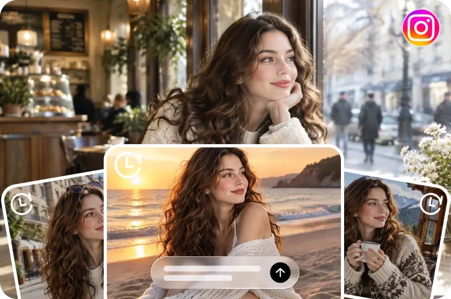
You have created an ai influencer with a look you love. The profile picture is ready, the character has a name, and the first introduction is posted. Now comes a harder question: what should this virtual creator share next? Dreamina can help you develop a character from a description or authorised image and explore new scenes; a content plan gives that character a reason to appear in each one.
A feed needs more than attractive portraits. Viewers may return for an idea, a comparison, a story or a question they enjoy answering. These formats can help creators and small businesses turn one character into a varied series, whether the subject is fashion, home goods or a creative hobby.
Choose a subject and three content pillars
Start with the audience you want to reach and the value you want to offer. An everyday-style account might help people combine colours; a home-goods shop might answer product questions; an illustration account might share creative prompts.
Imagine Mika, a fictional virtual host for an account about everyday outfits. Its three pillars are styling ideas, simple explanations and audience choices. For each pillar, note the question a post should answer and the format that makes the idea clear. Product accounts can use pillars such as collection introductions, practical information and ways to use an item.
Keep the character recognisable
Choose an approved character image and record the details you want to keep: hair, face, distinctive accessories and visual tone. Save the reference and reuse it where the image workflow supports it. Separate identity instructions from the outfit or setting you want to change.
For example: “Use the supplied character reference; keep the same short dark hair and silver earrings. Show the host in a light jacket and jeans in a café setting.” Compare new results with the reference: facial features and clothing can still change between images.
1. Compare two directions
A comparison gives viewers a specific reason to pause. Mika could show two styling concepts built around a neutral jacket: one with a colourful scarf and another with a simple bag. The caption can explain which element changes the mood and ask which direction readers prefer.
Create a two-image carousel. For the first image, describe the character, outfit, scarf, setting and framing. For the second, reuse the character reference and change the accessory.
Example prompt: “Use the supplied fictional character as a reference. Show a full-length editorial image of the host in a neutral jacket, dark trousers and a bright blue scarf. Simple studio background, soft daylight, relaxed pose. Keep the host’s key facial and hair features consistent.”
If the jacket changes between generated images, present them as two styling concepts rather than an exact comparison of one real item. Outside fashion, compare two colour palettes for a room or two visual approaches for an illustration.
2. Answer one common question
Start with a question from customer messages, comments or your own planning notes. A home-goods account might explain the difference between two verified sizes; a creative account could show how a limited palette changes an illustration.
Give the character a clear role: introduce the question, show the key information and end with a useful next step. Mika might ask, “How can a bright accessory change a neutral outfit?” and show two possibilities.
Suggested caption: “A little colour can change the focus of a neutral look. Here the scarf draws attention upward; a colourful bag creates a different accent. Which would you try?” Adapt the explanation to what the images actually show.
3. Introduce a product with useful details
A virtual host can introduce a collection while the post answers a buying question. For an accessories shop, that might be “What sizes does this bag come in?” Show an actual product photograph or verified diagram alongside the character, then link to the relevant product page.
Try a three-slide carousel: the host introduces the item, the next slide gives confirmed specifications, and the last directs readers to further details. If a generated scene uses an authorised product reference, check its colour, straps, closure and shape against the real item.
Avoid inventing personal experience for the fictional host. Instead of “I carried this bag all week,” use supported information, such as “Available in two sizes; see the product page for measurements.”
4. Build a short series around one question
A three-part series gives viewers a reason to see the next post. Mika’s question might be: “How can one accent colour change an outfit?”
Post one introduces a neutral base. Post two explores a bright scarf. Post three presents a different accessory and compares the two concepts. Explain each post so it still makes sense to someone who missed the earlier ones.
Plan the ending and visual references before generating. Similar framing can make the comparison easier to follow. If viewers suggest another direction, a later post can explore the actual response.
5. Let the audience choose
A clear choice is easier to answer than “What do you think?” Ask, “Which palette should Mika explore next: earthy neutrals or cool blues?” Show both options and explain the difference briefly.
A creative account could offer two illustration themes; a shop might invite questions about a collection and use them to plan a factual follow-up. Read and manage replies as the account owner, and obtain permission when reusing someone’s contribution requires it.
6. Share how a visual idea developed
The character does not have to be the only subject. Show a brief, two drafts and the selected image, explaining one decision along the way. For example, Mika’s creator might show a muted outfit followed by a brighter accessory and explain how simplifying the background helped the styling stand out.
Use a carousel with readable text. A prompt excerpt or close-up of the changed detail gives readers something practical to learn. Remove private material from screenshots and check permissions before sharing anyone else’s work.
7. Turn one idea into a short video
A clip can introduce a question, reveal two alternatives or present a compact story. Mika might appear beside the title “One jacket, two directions,” followed by two still images and a closing question.
You can animate an approved character image or edit stills together with text. A motion brief might say: “Use the supplied character reference. The host turns slightly toward the camera and gestures toward the space beside her. Slow camera movement, soft studio light. Keep the face, hair and outfit consistent.” Add titles and captions in an editor where the wording can be checked.
Watch the full clip: hands, faces and clothing can change during motion. If that distracts from the idea, simplify the movement or use still images. Preview the crop and text on a phone.
8. Adapt a trend to your subject
A popular format can provide a structure for an idea your audience already cares about. A transition could reveal two colour combinations, while a “choose one” post could show two ways to arrange a room.
Begin with the audience question, then decide whether the format makes it clearer. Keep the character recognisable, and check permissions for music, footage, reference images and likenesses. A trend can inspire a post, but it does not guarantee reach.
Plan the next seven posts
A small batch offers variety without committing to a long calendar. For Mika, a practical sequence could be:
• Compare a scarf and a bag as colour accents.
• Explain how each changes the visual focus.
• Ask viewers to choose a palette for a future concept.
• Show the selected palette in a fictional outfit.
• Share how the image developed from prompt to final selection.
• Publish a short video revealing two related looks.
• Answer a question viewers actually asked, or explore another comparison.
This is a menu, not a required daily schedule. Record each post’s purpose, format, reference, caption and facts to check. If two posts convey the same idea with only a different background, combine them or give each a clearer role.
After publishing, look at comments, questions and saves alongside views. Consider differences in timing and placement before drawing conclusions. Use what viewers actually ask to decide which idea to develop next.
A final check before publishing
Review the character, visual continuity and any text in the image. Make it clear where appropriate that the host or scene is generated. For real products, verify claims and direct readers to accurate product information; disclose commercial relationships where required. Use references, music and other materials with the necessary permissions.
An established character gives an account a familiar face. A useful idea gives that character something worth sharing: a question to answer, a visual difference to explain or a conversation to start.
DISCLAIMER – “Views Expressed Disclaimer – The information provided in this content is intended for general informational purposes only and should not be considered financial, investment, legal, tax, or health advice, nor relied upon as a substitute for professional guidance tailored to your personal circumstances. The opinions expressed are solely those of the author and do not necessarily represent the views of any other individual, organization, agency, employer, or company, including NEO CYMED PUBLISHING LIMITED (operating under the name Cyprus-Mail).




Click here to change your cookie preferences